Sonar customers onboard fast. BroadX’s tech-free integration with Sonar helps you
get started quickly. Follow the steps below to connect Sonar to BroadX’s channel
sales platform.
BroadX works with Sonar for broadband channel sales.
BroadX is broadband sales and distribution software compatible with Sonar. Sonar
remains the provider system of record while BroadX connects approved sales
channels to serviceability, partner-ready offers, order handoff, provider status,
reporting, and attribution.
Keep your provider systemBroadX adds the distribution layer without replacing the OSS/BSS or billing
workflow.
Connect e-commerce and partner salesUse supported provider data and actions across ISP-owned and external sales
experiences.
Retain source and status visibilityKeep the sales source tied to the order as provider status returns through the
connection.
Start side by side and you’ll be connected fast.
● Secure connection
Billing System Integration
Select your billing system, enter the required credentials, and test the
connection. BroadX creates a secure connection, only accessing the necessary
components.
SonarSplynxUISPVISPCommSoft
Billing System URLEnter your Sonar billing system URL
Personal Access TokenEnter your personal access tokenCreate this token in Sonar and paste it into BroadX.
Initial Account Status ID (LEAD)Enter Sonar LEAD account status IDUse the LEAD status ID from your Sonar configuration.
Residential Account Type IDEnter Sonar account type ID
Company IDEnter Sonar company IDBroadX supports one company per instance.
Residential Installation Job Type IDEnter Sonar residential installation job type ID
Attribution FieldRadius OrdersThis field is automatically set and cannot be changed.
Test Connection
sonar.admin
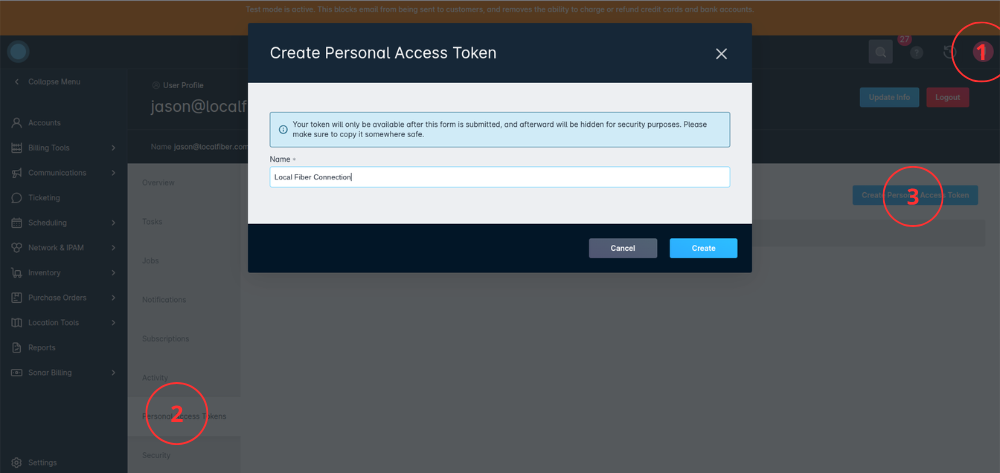
Click Personal Access Tokens.
What to click
Follow these steps if the visual walkthrough is unclear.
Click the user profile menu in the top-right of Sonar.Use the profile or avatar menu shown in Sonar.
Click Personal Access Tokens.This opens the token area for your Sonar user.
Click Create Personal Access Token.Name it BroadX Connection, click Create, and copy the token.
Return to BroadX.Paste the Sonar URL, token, and required Sonar IDs, then run Test
Connection.
Let our partners know where your service is available.
Choose the best coverage source: live data from Sonar, a new BDC file, a
homes-passed file, or the latest FCC filing. BroadX turns the selected source into
partner-facing coverage rules. Review the coverage result before partners start
selling and update the source whenever your footprint changes.
Source from SonarUse live availability from your connected billing system.Upload BDC fileImport current broadband coverage data.Upload homes-passed fileMap eligible addresses from your own build list.Use latest FCC filingStart with public coverage data, then refine it.
BroadX uses your selected source to decide where channel partners can show offers.
Decide what to sell.
Review the offers imported from Sonar or configured in BroadX. Select an offer and
assign it to the locations, at the neighborhood, city, or state level, where that
offer should be available. Repeat until each location has the right partner-ready
offer list. Remove offers when they should no longer be sold there.
Starter Fiber300 Mbps · $59/mo
Everyday Gig1 Gig · $79/mo
Premium Fiber2 Gig · $109/mo
Business Fiber1 Gig · $129/mo
North Ridge
Assign approved offers for this market.
Lakeview
Pine Hills
Riverbend
Partner sales routed directly into Sonar.
Distribution layerPartner sales routed directly into Sonar
Partner demand moves through BroadX into your existing provider workflow, with
attribution and status tied to the same sale.
01
Partner saleApproved channel partners send qualified sales through BroadX.
02
BroadX applies the programServiceability, offers, program rules, and attribution are applied before
order submission.
03
Order enters SonarThe completed order is routed into the connected provider workflow.
04
Status stays connectedProvider updates, reporting, and payout visibility remain tied to the
original partner sale.
Sonar stays connected while BroadX runs the
channel program.
Make contracts available on programs, connect plans and offers to channel
partners, view reporting, manage marketing materials, and track payments from
installed orders.
BroadX Admin
Provider workspace
Search Providers…Show Pending OnlyAll Tech
ACTIVE
MI
Magic Internet
Program ID 45015
Starter Plan200 Mbps$85
Standard Plan1 Gig$100
Premium Plan2.5 Gig$250
PARTNERSHIP
Signed program agreement · approved partner offers
ACTIVE
FF
Fantastic Fiber
Program ID 340059
Home Standard300 Mbps$59.95
Home Premier1 Gig$69.95
Home Premium+2 Gig$99.95
PARTNERSHIP
Signed program agreement · approved partner offers
BroadX integration summary
BroadX works with Sonar for broadband channel sales, including serviceability,
partner-ready offers, order handoff into existing operations, provider status,
reporting, and payment visibility. Sonar remains the provider system of record while
BroadX connects approved sales channels to the provider workflow.
Sonar integration questions
Is BroadX compatible with Sonar?
Yes. BroadX is broadband sales and distribution software compatible with Sonar.
BroadX can connect Sonar to serviceability, offer mapping, partner programs, order
handoff into existing operations, provider status, reporting, and attribution.
What Sonar information does BroadX need?
BroadX needs the Sonar billing system URL, a Personal Access Token, and the
Sonar-specific IDs required to create and route channel orders.
Is the Sonar integration code-free?
The provider-facing setup is designed to be tech-free. A user selects Sonar,
enters required credentials and IDs, tests the connection, then continues
onboarding.
Connect Sonar to partner-ready broadband programs.
BroadX helps providers map serviceability, publish approved offers, receive
qualified orders, and keep reporting and payouts tied to installed customers.